- Product Updates
Introducing Image Gallery for Microsoft Teams
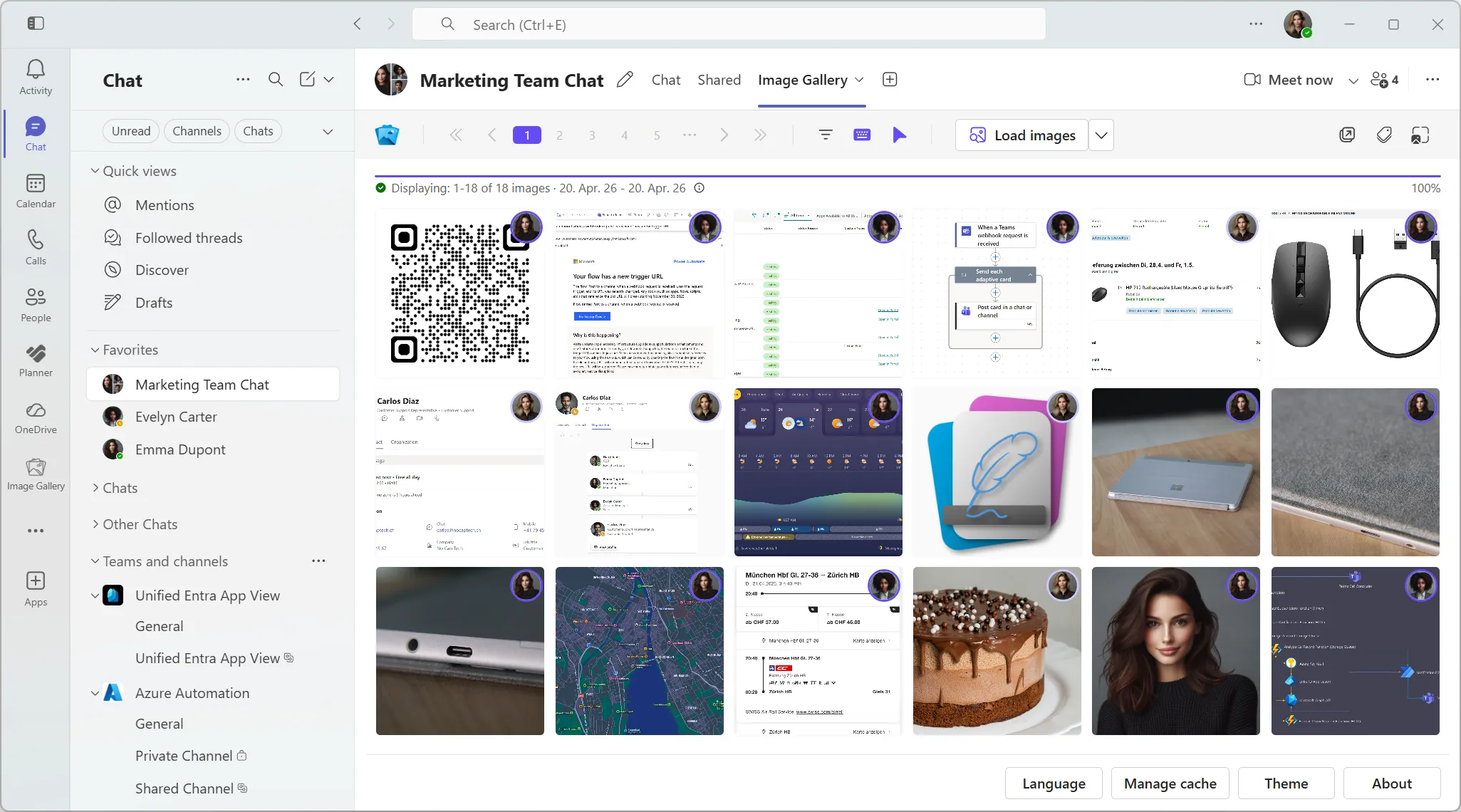
Image Gallery turns images from Microsoft Teams chats and channels into a searchable, filterable gallery, so teams can find visual context without scrolling forever.

Martin Heusser
Founder / Engineer

Today I am introducing Image Gallery, a Microsoft Teams app built for a problem many teams know too well: important images get buried in chat.
Screenshots, whiteboard photos, mockups, error messages, receipts, field updates, customer examples, and quick visual notes all end up in Teams conversations. They are often the fastest way to explain something in the moment. But a few days or weeks later, finding that one image again usually means scrolling, guessing the right date, asking who sent it, or giving up.
Image Gallery gives those images a proper home inside Teams.
Why I Built It
I have worked with Microsoft Teams and Microsoft 365 for years, and some of the most useful solutions are not the ones that try to reinvent how people work. They are the ones that remove a small, repeated frustration from a workflow people already use every day.
Image Gallery is that kind of product.
It does not try to replace Teams. It does not turn Teams into a media archive. It simply gives every supported chat or channel a focused image view, so users can browse, filter, search, and open the images they already have access to.
That sounds simple. It should be simple. But once you have it, it feels like something Teams should always have had.
What Image Gallery Does
Image Gallery can be added as a tab to a Microsoft Teams chat or channel. From there, it displays the images shared in that conversation, including inline images sent directly in Teams messages and images stored through OneDrive or SharePoint.
The app is designed around the way people actually look for images:
- Chat and channel galleries show the images from a specific Teams conversation in one visual view.
- The personal tab app gives users a broader place to browse images across enabled chats and channels.
- Intelligent filters help narrow large image histories by practical context such as sender, date, calendar week, chat, channel, storage source, and message context.
- Full screen viewing lets users inspect images, move through nearby images, copy, download, zoom, and jump back to the original Teams message.
- Context badges make it easier to understand what an image belongs to before opening it.
- AI Image Search can make text inside images searchable with on-device OCR.
The goal is not to add another place people need to manage. The goal is to make the visual information already inside Teams easier to recover.
Built For Microsoft 365 Environments
Image Gallery uses Microsoft Graph with delegated permissions. That means users only see images they are already allowed to access in Teams.
The trust model matters to me. Images, message content, local preferences, cache metadata, and optional image processing results stay local in the Teams client. Image Gallery does not store Teams message content or Teams images on Dialtone Apps servers.
The backend is used for the things a product needs behind the scenes, such as authentication token exchange, licensing, usage metering, and customer administration. It is not used to collect or store the content of your Teams conversations.
AI features are designed to run on the user’s device, and organizations that do not want AI image processing can request to disable it at the license level.
The First Dialtone Apps Product
Image Gallery is also the first product under Dialtone Apps.
The name has a little story behind it. A dial tone is easy to ignore when it is there, but you notice immediately when it is missing. That is the kind of software I want to build: focused Microsoft 365 apps that solve everyday problems so naturally that they feel obvious once they exist.
Image Gallery starts with one of those everyday problems: visual context getting buried in Teams.
Who It Is For
Image Gallery is useful for teams that share a lot of visual information in Microsoft Teams:
- Project teams reviewing screenshots, designs, and progress photos.
- Support teams looking for error messages or customer-provided images.
- Operations teams sharing visual updates from the field.
- Communities and internal groups where images carry important context.
- Any team that has ever said, “Where was that screenshot again?”
If the image exists somewhere in the chat history and the user has permission to see it, Image Gallery is built to make finding it feel less like archaeology.
What Comes Next
This launch is the beginning. I am continuing to refine the app, documentation, pricing, admin guidance, and onboarding experience so teams can evaluate it without guesswork.
If Image Gallery sounds useful for your organization, take a look at the features, review the setup guide, or get in touch for a demo.
I am excited to finally share it.
Start Finding Images in Teams Faster Today.
Install Image Gallery and use it for free or purchase a paid plan if your organization requires more than 50 users or any other paid feature.