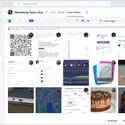
Chat and Channel Tab App
See every image sent in a specific Microsoft Teams chat or channel, including inline images that are not stored on OneDrive or SharePoint.
The chat and channel tab keeps Image Gallery close to the conversation. Add it to a Teams chat or channel and it gives that space a dedicated image view.
Instead of scrolling back through message history, users can browse the images that were shared in that specific conversation. This includes inline images sent directly in Teams messages, not only files stored in OneDrive or SharePoint.
Why it matters
- Review visual updates without searching through old messages.
- Keep project, customer, or team images scoped to the right conversation.
- Give every important chat or channel its own focused gallery.
Designed for Teams work
The tab behaves like part of the Teams workspace. Users stay in context, open the images they need, and jump back to the original message when they need the surrounding conversation.
You might be interested in

Use a responsive image grid with automatic Teams theme detection, dark mode support, adjustable thumbnails, and a focused separate-window experience.

Browse, filter, and search images from all Image Gallery enabled chats and channels in one personal Microsoft Teams app.
Get Started and make your users happy, Today.
Enjoy a 10-day free trial — experience all features, risk-free.